


Creating a website for your business is and remains essential for developing your online presence. But creating a website can quickly become overwhelming if you don't know anything about the technical side. How do you do it? Which platform should you choose? I know 🙂
If you'd like to create an attractive website for your business, you've probably already looked for solutions and may have heard of Canva? With Canva, you can create "static" web designs without being an expert. So you might have thought, why not just build my site with Canva? 🙂 In this article, we'll explore the advantages and disadvantages of this choice, and you'll see Why creating a website with Canva isn't necessarily the best solution to have a professional and long-term website for your business.
What is Canva?
Canva is an online tool that allows you to create various types of graphic designs without needing in-depth design knowledge. Previously, creating a logo, a visual identity, a business card, or any other communication material essentially involved professional software like the Adobe suite (Photoshop, Illustrator, etc.).
Now, Canva makes graphic design accessible to EVERYONE via an online and inexpensive interface (that doesn't mean you can become a graphic designer in the blink of an eye, let's be clear, but it remains an extremely practical tool!).
In addition to that, Canva offers plenty of pre-designed templates to help you imagine and shape your projects, whether it's a logo, an advertising poster or a website.
Basically, it helps you create something good even if you're terrible at design and graphics. But is it really a viable solution? How to create a website with Canva? Mmmh, let's see that right away!
The advantages of creating a website with Canva
If you use Canva to create your social media posts, you know it's a very easy-to-use graphic design software. You simply click on the elements, change colors, and drag and drop the blocks as you wish; it's incredibly user-friendly.
And that's also what Canva promises with its "Website Builder" feature.
It works exactly the same way in terms of the interface for creating a Canva website:
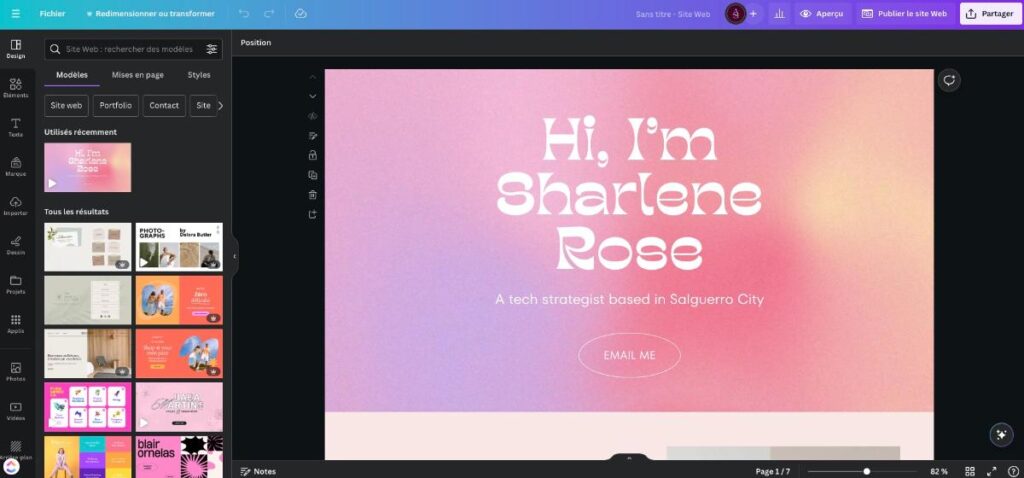
So here are the advantages of this option:
- Quick start guide: Canva is very easy to use and offers a simple and intuitive interface. You can get started quickly and easily thanks to the many templates available.
- Accessibility: The tool is accessible from any web browser and does not require any specific software installation on your computer.
- Extensive library of models/templates: Numerous design options are available to customize the look of your website to suit your needs and style. Simply choose a template, personalize it, add your content, and you can publish your website online.
- Time saving: No technical aspects, templates, a few clicks and your website can be created in no time.
- Free tool: For basic use, Canva can be used for free. However, additional options are available through a paid subscription. Creating a website with Canva is free when you use the free domain name, but it will look something like domainname..canva.site, Not exactly professional, is it? However, you have the option of using your own domain name with the premium version.
Test our Showit templates with these Canva website mockups!
The disadvantages of using Canva to create a website
Now that we've seen the advantages, Canva is indeed a good solution for quickly creating a website on paper. You can easily create designs and get a nice result, but a website is much more than just web design.
A professional and effective website needs to be designed in an optimized way (structure, design, natural referencing or SEO optimization...) and you clearly can't really do that with Canva.
Here are the main disadvantages of creating a website with Canva:
- Technical limitations: Canva doesn't allow you to design complete and functional websites like specialized tools. It's mainly limited to creating visuals for your digital project, without the ability to manage the technical aspects related to website development and hosting. You can only create a one-page website, which isn't ideal for SEO. Basically, it's like having a static website mockup online, nothing more, nothing less.
- No blog section: The benefit of having a website for your business is to increase your online visibility and generate leads. A blog is usually very helpful for this. However, with a Canva website, you won't be able to do this because this feature simply doesn't exist.
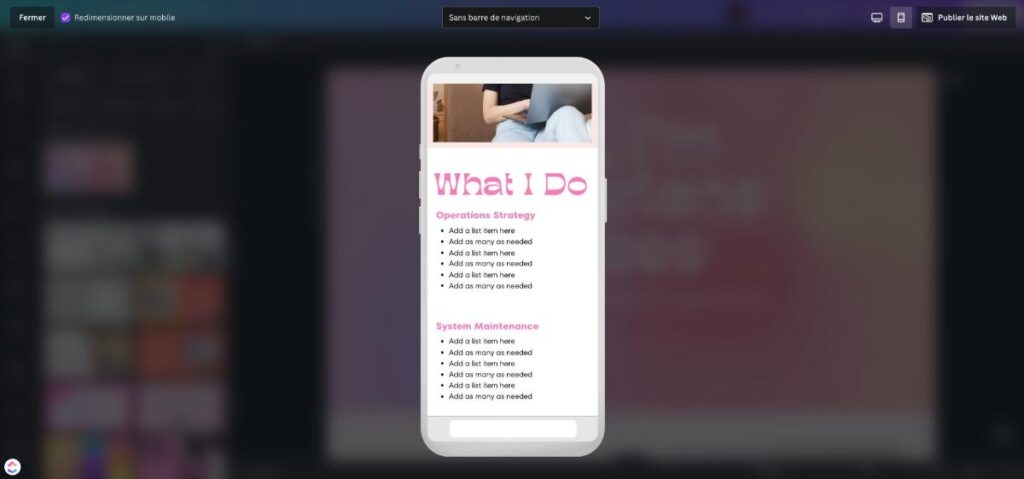
- No responsive design support: When you create a website on Canva, it's like a static website mockup, and you don't have the option to adapt the mobile version as you wish. Canva offers a "resize for mobile" option, but that's all.
- Few options for SEO optimization: Due to these limitations, it's difficult to achieve a high-performing, search engine-optimized website using Canva. SEO optimization is key to ensuring your site's visibility online, and this simplified solution risks hindering its effectiveness. Canva only allows you to add Title and Meta Description tags, whereas effective SEO goes far beyond that.
- Limited customization: Despite the wide variety of templates offered, your room for maneuver to customize your site will be less than with other web design solutions, which can be a problem if you want to fully express your identity or stand out from the competition.
- The cost when using the pro plan: If you decide to access Canva's premium features, these can prove expensive compared to other alternatives that offer more extensive possibilities.
As you can see here via the "Preview" feature, mobile resizing is applied automatically via the checkbox, but apparently we cannot manage the final result;
Create a free website with Canva
Creating a website with Canva is free with the free .canva.site domain.
However, here are the costs to expect when creating your website with your own domain name;
- The annual price of the domain name (approximately €10/year)
- The price of a Canva Pro license: €110/year
That's a total of about €120 per year to create a Canva website.
In comparison, creating a professional website using a platform like WordPress or Showit will cost you;
- €72/year for a self-hosted WordPress site on a hosting plan Planethoster + the cost of a DIVI template to use a pre-designed website template
- Between €210 to €270 per year for a Showit website with the Basic plan or with Blog
How to create a website on Canva?
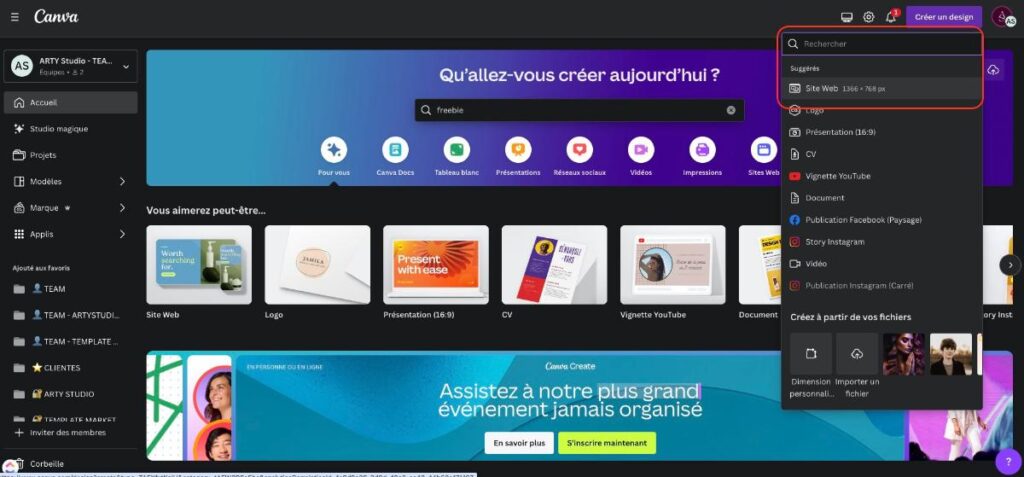
Creating a website on Canva is very simple, you just need to;
- Log in to your Canva account
- Click on ""Create a design"" top right
- Choose the option ""Website"" (or search for it in the search bar)
- Once you're in your editing interface, simply select one of the website templates that Canva offers you in the left-hand sidebar (or you can start from scratch if you wish)

Roadmap Notion: The step-by-step action plan to create and launch your professional website
My opinion on creating a website with Canva
As you will have understood from this article, I do not recommend creating a website with Canva when you want to create a professional website to develop the visibility of your company and you are thinking long term for your business.
Canva might be a good temporary solution for creating a small one-page website, a portfolio, or a sales page when you're starting out, for example, BUT it's not a viable long-term solution (at least not at the time of writing this article). to create a professional website.
Canva doesn't allow you to create a REAL website which should allow you to develop your company's online visibility (because it lacks SEO and search engine optimization features). Overall, a Canva website is more like a static website mockup published online (which can perfectly do the job depending on your needs), but if you want to invest heavily from the start to develop your visibility and SEO, then forget about Canva for that.
Showit: the Canva alternative for creating a professional and high-quality website just as easily and intuitively!
Faced with Canva's limitations for creating a website, you may be disappointed and wondering if there's an equally easy solution that allows you to have a REAL professional website?
Well, you won't be disappointed because YES, it's true! A more complete alternative for creating a real website, but just as easily and intuitively as on Canva, I present to you: Showit, a great tool for easily creating your website without coding!
This is a tool specifically designed for web design, offering many more possibilities in terms of customization and optimization for a professional and high-performing result.
Thanks to Showit You can create a real website for your business without any technical knowledge and all the missing features on Canva are there, such as;
Why choose Showit over Canva?
- A tool dedicated to website creation: Unlike Canva, Showit is specifically designed for creating websites. You therefore benefit from a complete and consistent solution to successfully develop your digital project.
- Advanced design customization without technical knowledge or coding: The platform allows you to modify all the visual and functional aspects of your site. This way, you can fully express your creativity and build a unique identity to stand out.
- Advanced features: Showit integrates key options, such as animation management, WordPress blog integration, and the ability to integrate external tools using "embed" code (like a newsletter form).
- Complete and simplified management of responsive design: You can fully control how your site looks on desktop and mobile devices.
- SEO optimization: The platform makes it easier for your site to rank in search engines with dedicated tools and optimized loading performance.
- Compatibility with other tools: Showit allows for easy integration with external solutions such as Shopify for your e-commerce, or WordPress for your blog articles.
And if you're wondering How to create your Showit website, I invite you to read this article.
Our website templates: the best choice to get started with Showit
To make your experience with this Canva alternative easier, we offer website templates. Designed by web design experts, they're ready to use. With them, you can save time on design while enjoying a visually appealing and functional result. Plus, they're fully customizable to your tastes and needs for a unique result that truly reflects your brand!
So, if you want to create a professional, attractive, and high-performing website, I definitely recommend you look at Canva as a troubleshooting solution, not as a real long-term foundation for your business.
If you're still at the stage where everything is a bit unclear regarding your positioning, target audience, or keywords, start by laying a solid foundation with the AI Foundations Business & Website Package.
If you already know what you want to offer but are stuck on the text for your website, the Website Content Writing + AI Package It can really help you structure and write your pages more easily.
And if you want a real framework to create your site step by step, with a template, tutorials, personalized feedback, a final audit, and AI assistants to help you progress without getting sidetracked, then Website Partner support is probably the most complete solution for you.
>> Discover our Showit templates Here to start creating your site as easily as on Canva!

Do you finally want a website that reflects who you are, makes you visible, and brings you clients?
🛍️ Discover our website templates And sales pages, designed for entrepreneurs who want a professional and efficient foundation.
🔥 And if you want to go further:
join: WEBSITE PARTNER: Guided support to create or redesign your website in 6 weeks, without getting scattered and without doubting yourself at every step.
FAQ: Creating your website with Canva
Does Canva allow you to create a good website?
Canva allows you to create a simple and visually appealing website very quickly. The platform offers ready-to-use templates that allow you to publish a web page without any technical knowledge.
However, Canva remains best suited for creating a simple page or a mini showcase website. If your goal is to build a strategic website capable of ranking well on Google, structuring multiple pages, or generating customers, the possibilities remain limited.
Canva peut donc être une bonne solution pour démarrer rapidement, mais il est souvent nécessaire d’utiliser une plateforme plus complète si ton site devient un vrai outil pour ton business.
FAQ: Creating your website with Canva
Peut-on créer un site web entier sur Canva ?
Oui, il est techniquement possible de créer un site web entier avec Canva grâce à la fonctionnalité Canva Websites.
Tu peux concevoir une page web complète en utilisant l’éditeur visuel, ajouter des sections, des images, du texte ou encore des boutons. Canva permet ensuite de publier la page directement en ligne.
En revanche pour des projets plus complexes avec plusieurs pages, un blog ou une stratégie SEO avancée, d’autres outils seront généralement plus adaptés.
Canva peut-il se transformer en site web ?
Oui, Canva permet de transformer un design en site web grâce à sa fonctionnalité de publication.
Une fois ton design terminé, tu peux simplement cliquer sur “Publier en tant que site web” et Canva génère automatiquement une page accessible en ligne. Tu peux alors partager le lien ou connecter un nom de domaine personnalisé.
Cette fonctionnalité est particulièrement pratique pour créer rapidement une page de présentation, un portfolio ou une page événement sans passer par un outil de création de site plus technique.
Peut-on référencer un site Canva sur Google ?
Oui, un site créé avec Canva peut être indexé par Google et apparaître dans les résultats de recherche.
Cependant, les possibilités d’optimisation SEO restent limitées. Canva ne permet pas toujours de gérer en profondeur certains éléments importants du référencement comme la structure complète du site, l’optimisation avancée des balises ou la création d’un blog.
Cela signifie qu’un site Canva peut être trouvé sur Google, mais il sera généralement moins optimisé pour le référencement qu’un site créé avec WordPress ou Showit, qui offrent beaucoup plus de contrôle sur le SEO.
Peut-on connecter un nom de domaine à un site Canva ?
Oui, Canva permet de connecter un nom de domaine personnalisé à un site web créé sur la plateforme.
Au lieu d’utiliser l’URL Canva par défaut, tu peux associer ton propre domaine afin d’obtenir une adresse plus professionnelle pour ton site. Cette option est généralement disponible avec certaines fonctionnalités premium de Canva.
Utiliser un nom de domaine personnalisé est recommandé, car cela renforce la crédibilité de ton site et facilite sa mémorisation pour tes visiteurs.
Quel est le meilleur site de création de site internet gratuit ?
Il existe plusieurs plateformes qui permettent de créer un site internet gratuitement, comme Canva, WordPress ou encore certaines solutions no-code.
Le choix dépend surtout de ton objectif. Canva est très simple à utiliser pour créer une page rapide et visuelle, tandis que des outils comme WordPress ou Showit offrent davantage de possibilités pour construire un site plus structuré et optimisé pour le référencement.
Si ton objectif est de créer un site stratégique qui attire des visiteurs et génère des clients sur le long terme, il est généralement préférable d’utiliser une plateforme qui offre plus de contrôle sur le SEO et la structure du site.
